How to let Claude Code use an API key without seeing it

Don't paste the key into the chat, and don't leave it where Claude Code can read it. Give the key to the program that needs it, at the moment that program runs, and make sure the value never comes back as text the model reads. In practice that means three things: deny rules for your .env files, keys injected per command instead of exported in your shell, and, if you want the agent to do it on its own, an MCP server that hands keys to a process without ever returning them.
I build Keyfold, a vault for API keys, so I've spent a lot of time on this exact problem. This post shows each step with the real settings, what each one does and doesn't cover, and where a key can still slip through.
Why it matters if Claude Code sees a key
Anything Claude Code reads becomes part of the conversation. A key in the conversation is sent to the model with every following message, it sits in your local session history, and it can end up in a summary, a commit message or a log the agent writes. None of that is a bug. It's simply what "the model read it" means.
The numbers say this is common. GitGuardian's State of Secrets Sprawl 2026 counted 28.65 million new secrets in public GitHub commits in 2025, and 24,008 unique secrets in MCP configuration files alone, the files people write to connect AI tools to other services. Keys leak where they are easy to reach.
What can Claude Code see by default?
Three places matter:
- Files in your project. Claude Code's permission table lists file reads and Grep as read-only actions that need no approval inside your working directory. A
.envfile in the project is one tool call away. - Environment variables. Shell commands that Claude Code runs start from the environment of the terminal you launched it in. If you ran
export OPENAI_API_KEY=…before typingclaude, thenprintenvshows the key to the agent. - Command output. Whatever a command prints comes back to the model. A test that logs its config, or an error message that includes a database URL with its password, puts the secret in the chat.

You can narrow all three. The first two are settings; the third is a habit.
Step 1: Deny reads of .env files
Claude Code reads settings from ~/.claude/settings.json (for every project) or .claude/settings.json (for one project). The settings docs give this example for stopping it from reading .env files:
{
  "$schema": "https://json.schemastore.org/claude-code-settings.json",
  "permissions": {
    "deny": [
      "Read(./.env)",
      "Read(./.env.*)"
    ]
  }
}
Run /status in Claude Code afterwards to check that the file loaded. If you keep keys in other places, add them too, for example Read(./secrets/**) or Read(~/.aws/**).
Two things are worth knowing before you rely on this:
For a real boundary, Claude Code has sandboxing, which restricts what shell commands can read and reach at the operating-system level. Deny rules stop the obvious reads; the sandbox stops the clever ones. Use both.
Step 2: Stop exporting keys in your shell
A key in ~/.zshrc or ~/.bashrc, or one you exported in the terminal, is visible to every program you start from that shell, the agent included. The fix is to give the key to one command at a time.
There are a few tools that do this. Each one keeps the key in an encrypted store and starts your command with the key set as an environment variable:
# 1Password CLI, with secret references in an env file
$ op run --env-file=./dev.env -- npm test

# Keyfold
$ keyfold run -p acme-api -e development -- npm testOnly npm test and the processes it starts get the key. Your shell doesn't have it, so the agent's printenv doesn't either.
One detail trips people up. Your shell expands $VARIABLES before the tool runs, so this prints an empty line: the variable was expanded too early, while it was still empty.
$ keyfold run -p acme-api -e development -- echo $OPENAI_API_KEY

# Empty: your shell replaced $OPENAI_API_KEY before Keyfold started.
# If the command needs the value itself, give it a program that reads it:
$ keyfold run -p acme-api -e development -- sh -c 'node scripts/seed.js'
(Better still, don't echo keys at all.)
Step 3: Let the agent ask, and approve each request
Steps 1 and 2 work when you run the commands. When you want Claude Code to run your tests or deploy script on its own, it needs a way to get keys that doesn't involve reading them. That's what an MCP server for secrets is for: the agent asks the server to run a command or write a file, and the server, not the model, handles the values.
Keyfold's MCP server works like that. You add it once:
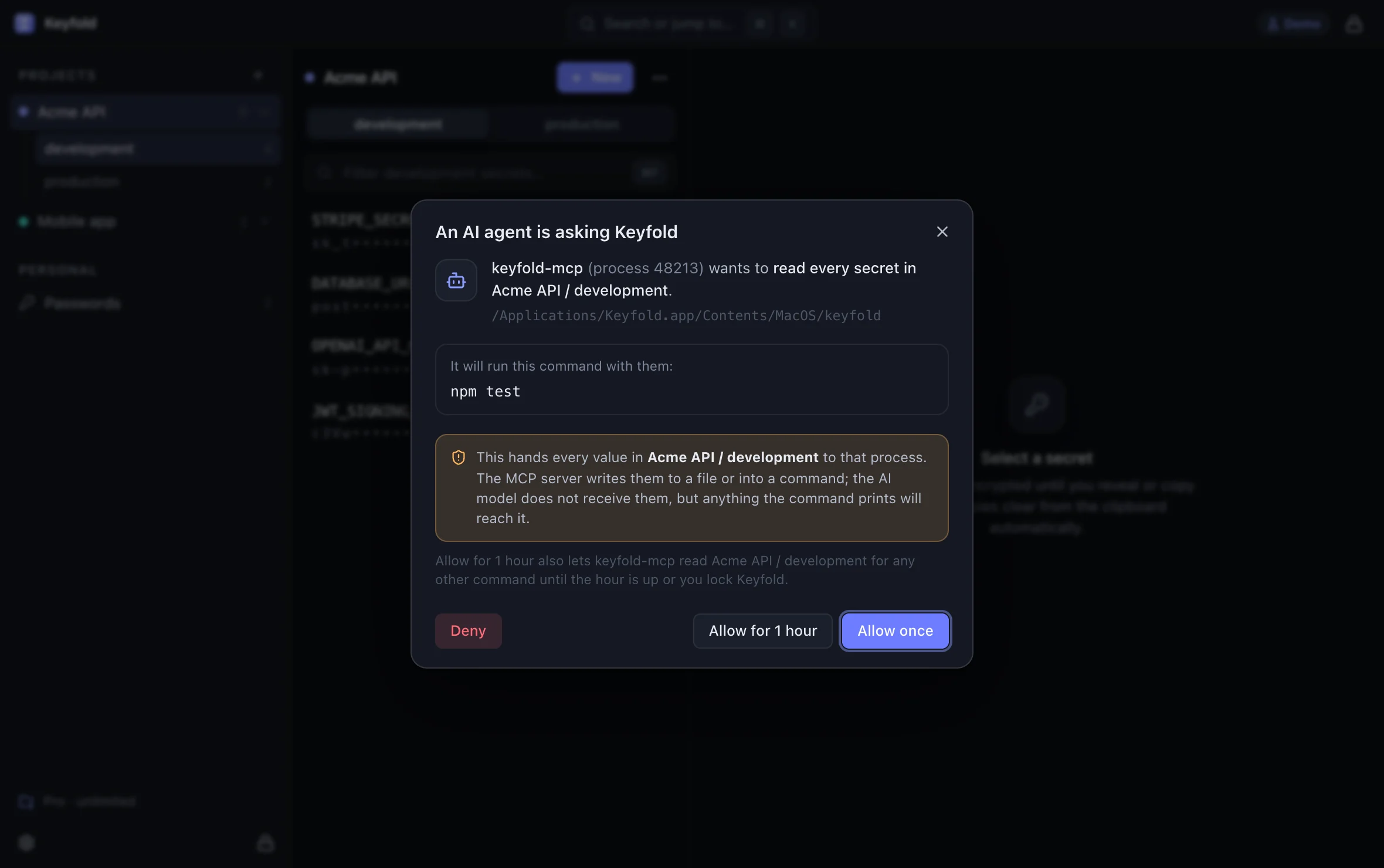
$ claude mcp add keyfold -- keyfold mcpIt gives the agent seven tools. They list project and key names, write an approved .env file, run a command with the environment injected, store a key the agent just created, create a project, and import a .env file. None of them returns a secret value. Every request appears in the Keyfold window first, with the client, the action, the project and the environment, and nothing happens until you click.

Here is the real approval sheet:
Open the approval sheet in the live demoOpens the live demo, with made-up keys
Keyfold isn't the only option. 1Password has an Environments MCP server that, in its own words, "never returns the secrets stored in your Environments". If you already pay for 1Password, try that first. The idea that matters is the same in both: the model gets names and results, never values.
What can still leak?
Being honest about the gaps is more useful than pretending there are none:
- Output. If a command prints a key, the agent sees it. Keyfold's run tool returns the command's output (up to 20 KB) so the agent can read test results, and that includes anything the command printed. Keyfold's approval sheet tells you the agent wants every value in that project and environment, and which command it will run. Under a one-hour grant, later commands show no new sheet, so keep Claude Code asking before it uses Keyfold's run tool, and deny anything like
printenvorcat .env. - Files the agent asked for. If you approve writing a
.envfile, that file now exists on disk. Keep the deny rules from step 1 in place so the agent can't read what it just wrote, and delete the file when you're done. - Your own copy and paste. The fastest leak is still pasting a key into the chat to "just test something". If you do, rotate the key afterwards.
- Malware. No vault, Keyfold included, protects keys from malicious software running as you while the vault is unlocked. That's outside what any of these steps can do.
A setup that works
Here is the setup I recommend for a solo project:
- Put keys in a vault, by project and environment, not in
.envfiles in the repo. - Add
Readdeny rules for.env,.env.*and any secrets folder to~/.claude/settings.json, and turn on sandboxing. - Remove
export SOME_KEY=…lines from your shell profile. - Run commands that need keys through
keyfold runorop run. - Give the agent an MCP server that never returns values, and approve each request.
- If a key ever lands in the chat, rotate it the same day.
If you want to see the approval flow before installing anything, the live demo runs the real Keyfold interface with made-up keys. The comparison table shows how Keyfold, 1Password, Bitwarden and KeePassXC each handle agents.
FAQ
Does Claude Code send my .env file to Anthropic?
Only if it reads it. Reading a file in your project needs no approval, so a .env file there can be read and sent as part of the conversation. Deny rules and the sandbox stop that.
Is my Anthropic API key safe with Claude Code?
That's a different key. According to Claude Code's authentication docs, it stores its own credentials in the encrypted macOS Keychain on a Mac. This post is about your project's keys: Stripe, OpenAI, your database.
Do deny rules stop every way of reading a file?
No. They cover Claude's file tools and common commands like cat, but not scripts that open files themselves or grep -r across a folder. The sandbox is the setting that enforces it for every process.
Does this work with Cursor or other agents?
The ideas do: keep keys out of files the agent can read, inject them per command, and use an MCP server that returns names, not values. Keyfold's MCP server works with any client that runs local MCP servers. Other posts on AI agents and secrets cover more tools.
Where can I get Keyfold?
The Mac app is on the download page, and the Windows app is coming through the Microsoft Store. The live demo runs the real interface with made-up keys, and the security page explains how the vault and the agent connection are built.