Keyfold vs Bitwarden for API keys and developer secrets

If you need your passwords on your phone, autofill in the browser, a vault you share with someone, or secrets for CI pipelines, pick Bitwarden. Its free plan syncs across unlimited devices, it publishes third-party audits every year, and Secrets Manager is built for machines and teams. If you work alone, want your project keys in one encrypted file that never leaves your computer, organised by project and environment, and want AI agents to use keys only after you approve each request, Keyfold fits better. Plenty of developers will reasonably use both.
I build Keyfold, so weigh my view accordingly. Every Bitwarden fact below comes from Bitwarden's own pages and repositories, read in October 2026, and each one is linked.
Which Bitwarden are we comparing?
Bitwarden is two products, and developers often mix them up.
Bitwarden Password Manager stores logins, notes, cards and other items for people. The free plan is "Always free" with unlimited devices and passwords. Premium is $19.80 a year and adds the integrated authenticator (2FA codes), file attachments, emergency access and security reports (pricing). Its command line, bw, reads items once you unlock the vault and keep the session key in a BW_SESSION environment variable (CLI docs).
Bitwarden Secrets Manager is a separate product for machine secrets: projects of key and value pairs, machine accounts with access tokens, and the bws command line. The free plan covers up to 2 users, 3 projects and 3 machine accounts (plans). Teams is $6 and Enterprise $12 per user per month, billed annually, with integrations for GitHub Actions, GitLab CI/CD, Jenkins and Kubernetes (product page).
Keyfold is one desktop app: API keys by project and environment, plus passwords and 2FA codes, in a single encrypted file on your computer. A keyfold command line and an MCP server for AI agents are inside the app, and Install in Settings › General › Command line and MCP puts keyfold on your PATH. The Mac app is out now, and the Windows app is coming through the Microsoft Store.
So for API keys, the fair comparison is Keyfold against Secrets Manager. For logins and everything else, it's Keyfold against Password Manager.

How do they compare, feature by feature?
| Bitwarden Password Manager | Bitwarden Secrets Manager | Keyfold | |
|---|---|---|---|
| Account | Required | Required, in an organization | None |
| Where data lives | Bitwarden's cloud or your own server, cached on devices | Bitwarden's cloud; self-hosting listed for Enterprise | One encrypted file on your disk |
| Offline | Read-only while unlocked | Needs the server, though the SDKs can cache | Full read and write |
| Structure for keys | Folders, collections, custom fields | Projects of secrets | Projects, each with environments |
| Run a command with keys | Your own script around bw get |
bws run |
keyfold run |
| What authorises the CLI | BW_SESSION in the environment |
BWS_ACCESS_TOKEN in the environment |
A click in the app per request, or a one-hour grant |
| AI agents | MCP server that can read vault items, passwords included | bws run keeps values out of the agent's context |
MCP server whose tools never return a value |
| Browser autofill and mobile apps | Yes | No | No |
| Sync and sharing | Yes, sync is free | Sharing with users and machines | No built-in sync or sharing yet |
| Open source | Yes: GPL clients, AGPL server | SDK and bws under Bitwarden's own SDK licence |
Core under AGPL; the app's interface is closed |
| Third-party audits | Yearly, reports published | Product page says "Third-party audited" | None yet; uses the audited RustCrypto crates |
| Price | Free; Premium $19.80 a year | Free plan; Teams $6, Enterprise $12 per user a month | Free plan for 1 project and 25 items; Pro is a one-time purchase |
| Platforms | Windows, macOS, Linux, iOS, Android, browsers, web | CLI and SDKs | macOS 12 or later; Windows coming |
Sources for the Bitwarden columns: offline use, audits, downloads, the clients and server licences, and the Secrets Manager SDK licence. For Keyfold, the security page and the open-source core on GitHub.
How does each one let an AI agent use a key?
This is where the products differ most, and the details matter.
Bitwarden's MCP server connects an assistant to Password Manager through the bw command line. Its README is direct about what you hand over: the ability to "Read vault items including passwords, secure notes, and sensitive data" and to "Expose credentials and vault contents through AI responses". It's meant for local use only, and its config file holds a BW_SESSION token. One part is careful: the unlock tool opens a native password dialog, so your master password never passes through the model. Once the vault is unlocked, though, the get tool can return a password to the model.
Secrets Manager with bws run is Bitwarden's pattern for coding agents. Bitwarden's own guide moves keys out of .env into Secrets Manager and starts the script with bws run, so "If the agent reads the filesystem or runs printenv before bws run executes, there's nothing to find." It's also candid that "The only secret in the environment is BWS_ACCESS_TOKEN". That token is all the CLI needs, and bws secret list returns each secret with its value (CLI docs). An agent with a shell can run it too. Bitwarden's answer is scope: give the agent a machine account that sees only a few development secrets, so a leaked token reaches only those.
Agent Access is Bitwarden's newer approach, announced in March 2026: an open protocol and CLI in which the agent asks for one named credential, you approve it, and aac run injects it into a child process. Its README says the project is in an "early preview stage" and that "APIs and protocols are subject to change".
Keyfold keeps no token in the agent's environment. Every CLI or MCP request goes to the running app over a local socket that only your user can open, and waits for a click: Deny, Allow once, or Allow for 1 hour. The MCP server's seven tools return names, counts, exit codes and command output, never a stored value.
Two limits are worth saying plainly. A command you let run can still print a key into the output the model reads. And the approval sheet shows the command you approve, but an "Allow for 1 hour" grant then covers every request from that client name for the same project and environment, whatever the command, until the hour is up or you lock Keyfold. Later commands under the grant show no sheet. Every MCP client reports itself as keyfold-mcp, so a grant you give while using Cursor also covers Claude Code.

Where is Bitwarden the better choice?
- You want your vault everywhere. Free sync across unlimited devices, apps for iOS and Android, and extensions for every major browser.
- You fill passwords on websites. Autofill is Password Manager's core job. Keyfold has no browser extension yet.
- You share. Families plans, organizations, collections, and event logs on Teams. Keyfold is single-user.
- Machines need secrets without a person present. Secrets Manager's GitHub Actions, GitLab CI/CD, Jenkins and Kubernetes integrations are built for exactly that. Keyfold needs you at the computer to click.
- You want published audits. Bitwarden lists yearly third-party assessments, including 2025 reports on the core application, desktop app and browser extension. Keyfold has had no external audit yet.
- You want to run the server yourself. Self-hosting is documented, including Bitwarden lite, a single Docker image meant for personal use and home labs.
- You use Linux or a phone today. Keyfold is Mac only for now.
Where does Keyfold fit better?
- No account and no server. The vault is one file encrypted with XChaCha20-Poly1305 under a key from Argon2id. It works fully offline, reading and writing. The only connection the app can make is an update check on the Mac, and it asks before turning that on.
- Keys shaped like projects. Projects hold environments, environments hold keys, and each key keeps its notes, tags, expiry date and where to rotate it. You can import a
.envfile into an environment and export one back when a tool needs a file. - Agents that ask. Every request from Claude Code, Cursor or the CLI waits for your click, and no tool returns a value. That matters most if you run a coding agent all day.
- Quick paste. ⌘⇧K in any app, a few letters, Enter. The clipboard clears after 30 seconds by default, and clipboard managers skip the copy.
- Pay once. There's a free plan for 1 project and 25 items, and Pro is a one-time purchase, not a subscription.
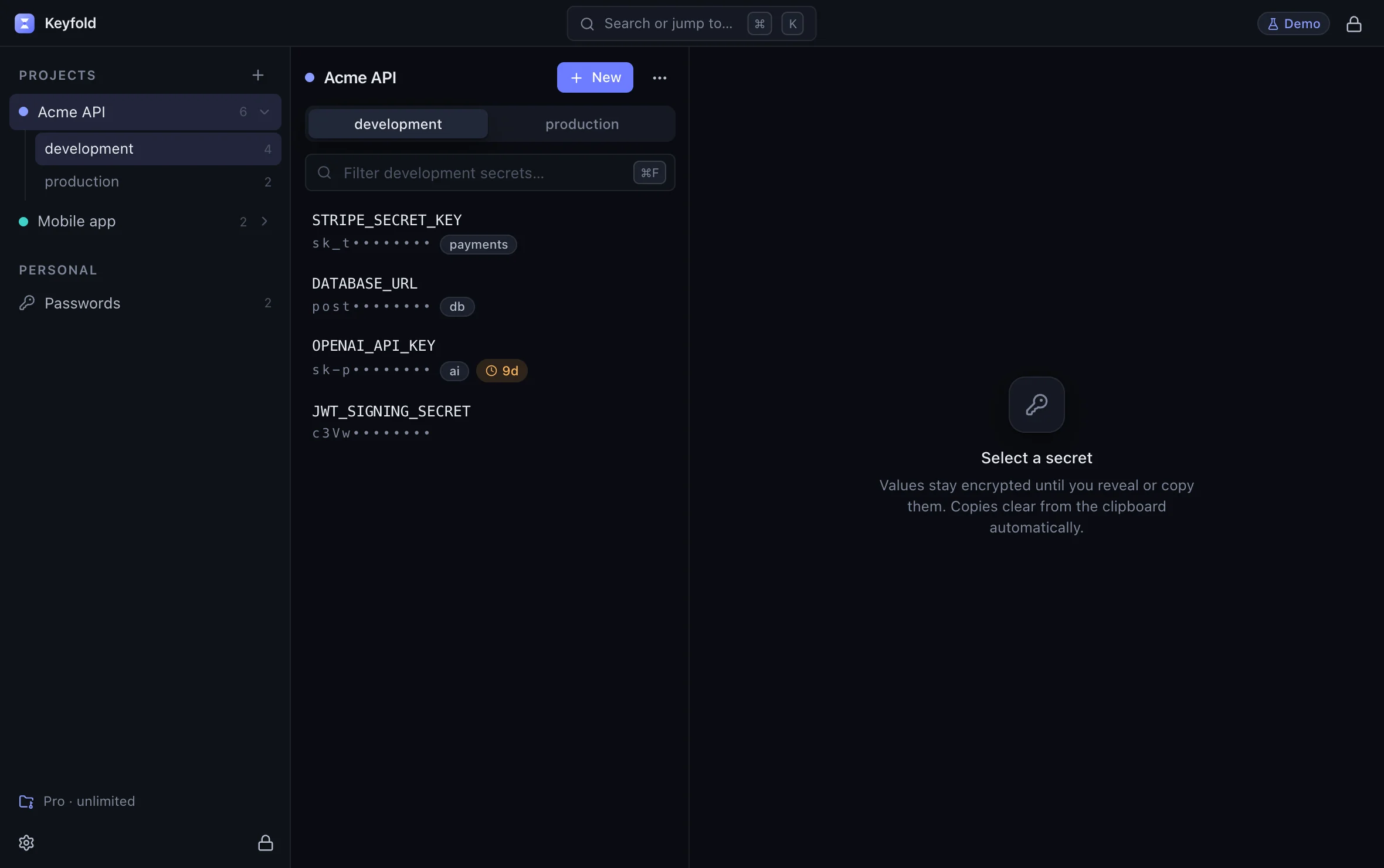
Browse the demo vault in the live demoOpens the live demo, with made-up keys
Can you use both?
Yes, and for many developers that's the right answer. Keep website logins and anything you need on your phone in Bitwarden. Keep project keys you use from the terminal and with coding agents in Keyfold. If Secrets Manager already feeds your CI pipelines, leave it there; Keyfold isn't built for machines with nobody at the screen.
To move keys across, Keyfold imports .env files today, from the project menu or the command line:
$ keyfold import -p acme-api -e development -f .env.localA direct importer for Bitwarden exports is on the roadmap, along with 1Password and CSV. After an import, delete the plain .env file.
FAQ
Is Bitwarden Secrets Manager free?
There's a free plan with unlimited secrets for up to 2 users, 3 projects and 3 machine accounts. Teams ($6) and Enterprise ($12) are priced per user per month on annual billing, according to Bitwarden's product page.
Does Bitwarden's MCP server let the model see my passwords?
It can. Its README lists reading vault items, passwords included, among the abilities you grant, and warns that AI responses may reveal sensitive information. Bitwarden says to run it only on your own machine or a self-hosted environment.
Can Keyfold sync between computers like Bitwarden?
Not yet. There's no built-in sync; some people keep the vault file in a folder they already sync and use one computer at a time. Folder sync with conflict handling is on the roadmap. One licence covers 3 computers.
Has Keyfold been audited like Bitwarden?
No. Keyfold hasn't had an external audit yet. Its cryptography comes from the audited RustCrypto crates, and the core (encryption, vault format, CLI and MCP server) is open source under AGPL, so anyone can read it. The security page lists what Keyfold protects against and what it doesn't.
Which should I try first?
If you mostly need logins on several devices, start with Bitwarden's free plan. If you mostly need API keys for local projects and AI agents, the live demo runs Keyfold's real interface with made-up keys, and the free plan runs the real app.
Keep reading

Doppler alternatives that work offline, compared
Doppler needs an account and, mostly, a connection. Offline options for a solo developer: a local vault, dotenvx, SOPS, KeePassXC or the Keychain.

Keyfold vs 1Password for developers: an honest comparison
1Password wins for teams, sync and browser autofill. Keyfold fits solo developers who want API keys offline, by project, with each AI agent request approved.

How prompt injection steals API keys, and what stops it
Seven documented attacks where hidden text made an AI agent leak keys or private data: where the text hid, what it took, how it got out, and what stops it.