Keyfold vs 1Password for developers: an honest comparison

Most of the difference comes from where each one keeps your vault. 1Password keeps it on its servers and syncs it to your devices, which is what makes teams, phones and browser autofill work, and it has years of outside security testing behind it. Keyfold keeps one encrypted file on your Mac (Windows is coming) with no account, so it suits a developer who works alone and doesn't want API keys in anyone's cloud. Both let AI agents use keys without returning the values, but they handle approval differently. Many developers will end up using both: 1Password for website logins, a local vault for project keys.
Side by side

| 1Password | Keyfold | |
|---|---|---|
| Account | Required | None |
| Where the vault lives | 1Password's servers, synced to your devices | One encrypted file on your computer |
| Platforms | Mac, Windows, Linux, iOS, Android, browsers | Mac desktop now; Windows coming through the Microsoft Store |
| Browser autofill | Yes | No |
| Sync between devices | Built in | Not yet (a synced folder works today) |
| Sharing and teams | Yes, with admin controls | No, one person |
| API keys by project and environment | Environments, in the desktop apps | Projects → environments → keys |
| Inject keys into a command | op run |
keyfold run |
| AI agents | Environments MCP server, names only, beta for Claude Code and Cursor | MCP server, 7 tools, none returns a value |
| Approval for agent requests | Prompt per client and Environment, lasts until 1Password locks | Prompt per request: once or for 1 hour, per client, project and environment |
| Quick paste | Quick Access | ⌘⇧K panel from any app |
| Spots keys you copy or leave in .env files | Flags .env files | Both, opt-in, 25 key formats |
| Network connections | Needed for sync and sign-in | None, except an opt-in daily update check on the Mac |
| Source code | Closed | Core is open source (AGPL) |
| Outside security testing | Regular third-party penetration tests, SOC 2 Type 2 | Not yet |
| Price | Individual $3.99 a month billed yearly ($2.99 in a promotion on 18 Oct 2026), 14-day trial | Free plan (1 project, 25 items); Pro is a one-time payment, see pricing |
Sources: 1Password pricing, op run, Environments, Environments MCP server, security assessments. Keyfold's details are on the security page and in the comparison table.
Where 1Password is better
Everything that involves more than one person or device. 1Password syncs your vault to every device, works on your phone, fills passwords in the browser, and lets you share vaults with a family or a team with admin controls. Keyfold does none of that today. Built-in sync is on Keyfold's roadmap; team sharing is not.
Outside scrutiny. 1Password says on its security assessments page that it regularly has independent firms test its products, and it holds a SOC 2 Type 2 report. Keyfold hasn't had an external audit yet. Its cryptography comes from the audited RustCrypto libraries, the core is open source so anyone can review it, and the test suite flips every byte of a vault file to prove tampering is caught. That's good practice, but it isn't the same as a paid audit, and I won't pretend otherwise.
A mature developer toolkit. op run, secret references (op://vault/item/field), service accounts for CI, SSH key management and integrations with many tools have been around for years. If your team already standardises on 1Password, adding Environments is less work than introducing a new tool.
Where Keyfold is better
No account and no cloud. Keyfold's vault is one encrypted file on your disk. There's no server holding vaults, so there's no account to phish and no company database to breach. The app makes no network connections unless you allow a daily update check on the Mac; activation of a paid licence happens once in your browser, not in the app. If you work on client projects with strict rules, travel a lot, or just don't want your API keys in anyone's cloud, this is the main reason to choose it.
Keys by project and environment, first. Keyfold is built around developer keys: projects hold environments (development, staging, production) and each key keeps notes, tags, an expiry warning and the link to where you rotate it. You can drag keys between environments, import and export .env files per environment, and it can spot keys you copy or leave in .env files (off by default; matching happens in memory, nothing is saved until you click).
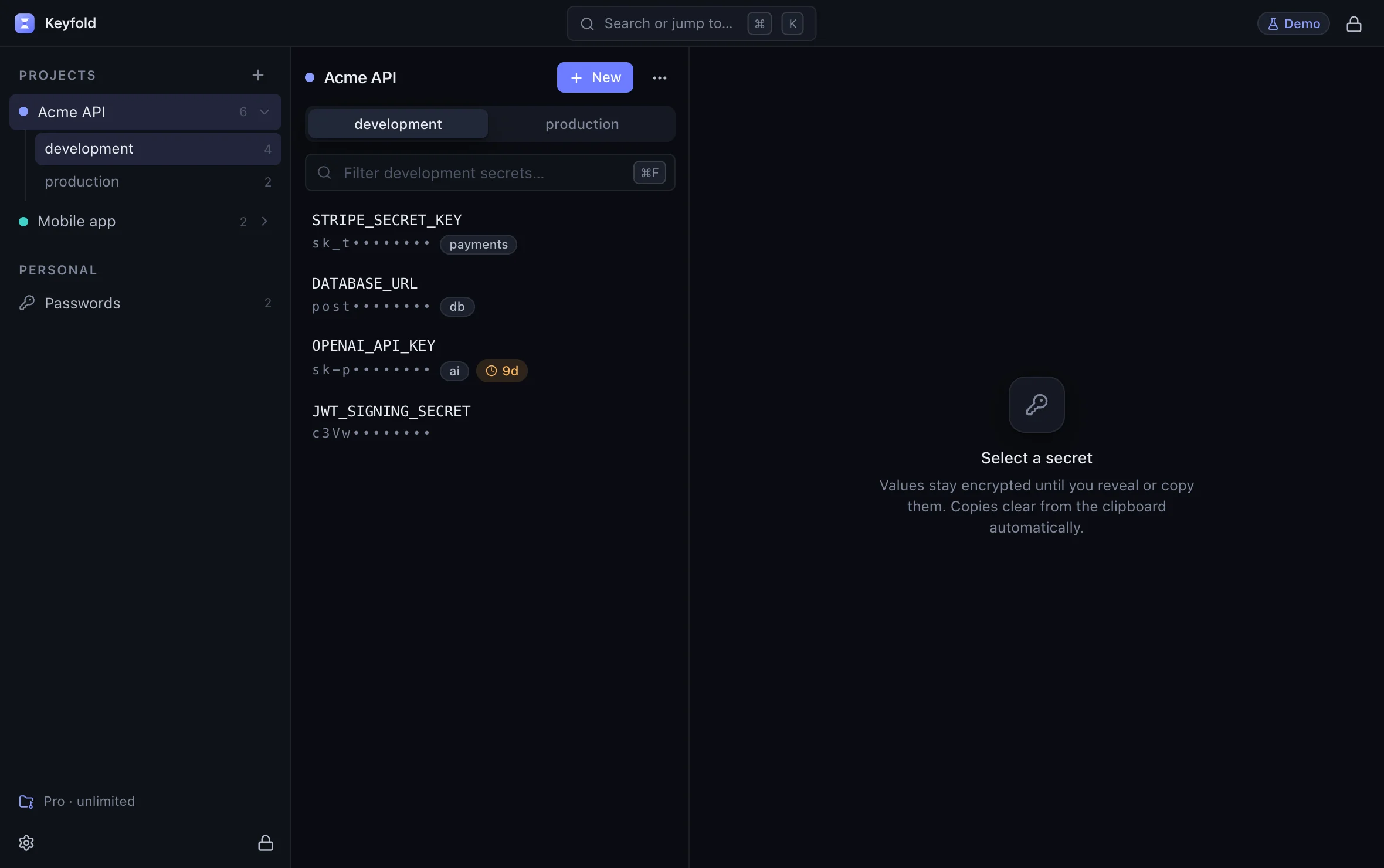
AI agents, approved request by request. Both products now let agents use keys without returning values, which is the important part. The difference is how approval works. 1Password's docs say that after you approve a tool for an Environment, the client can keep using it "without prompting you until 1Password locks". In Keyfold, every request shows up with the client, the action, the project and the environment, and you choose Deny, Allow once or Allow for 1 hour. Keyfold's local .env workflow and MCP server will also run on Windows when that app ships, while 1Password's docs say its local .env files "currently only support Mac and Linux".

Open the approval sheet in the live demoOpens the live demo, with made-up keys
Pay once. Keyfold has a free plan with every security feature (1 project, 25 items) and a one-time Pro licence that covers 3 of your computers. 1Password is a subscription, which also pays for the sync and support it provides.
How op run and keyfold run compare
Both inject keys into one command so they aren't in your shell or a file:
# 1Password: references in a file, resolved at run time
$ op run --env-file=./dev.env -- npm test

# Keyfold: a project and environment in the local vault
$ keyfold run -p acme-api -e development -- npm test
With 1Password you write a file of references and sign in to your account. With Keyfold there's no file; you name the project and environment, and Keyfold asks you to approve the request (once, or for an hour of test runs).

Can you use both?
Yes, and for a lot of developers that's the sensible answer.
Keyfold can hold logins and 2FA codes too, but if you depend on browser autofill, 1Password stays.
Who should pick which
- Pick 1Password if you work in a team, need sync and mobile apps, rely on browser autofill, or need a vendor with third-party audits for compliance.
- Pick Keyfold if you work alone, want keys offline in one file you control, juggle many projects and environments, or run AI coding agents and want to approve each request.
- Use both if you like 1Password for your personal logins but want project keys kept local.
The live demo runs Keyfold's real interface with made-up keys, so you can see the project and agent screens before deciding.
FAQ
Is 1Password safer than Keyfold?
They protect against different things. 1Password has years of outside testing and protects your synced vault with your password and Secret Key. Keyfold removes the server entirely, so there's nothing remote to breach, but it hasn't been audited by an outside firm yet. Both rely on your device being free of malware while the vault is open.
Does Keyfold import from 1Password?
Not yet. Importers for 1Password, Bitwarden and CSV are on the roadmap. Today you can import .env files per environment.
Can 1Password's MCP server read my secret values?
According to 1Password's docs, it can only see variable and Environment names and never returns secret values to the client. That's the same principle Keyfold's server follows.
Does Keyfold work on Linux or my phone?
No. Keyfold is a desktop app for Mac, with Windows coming through the Microsoft Store. If you need Linux or mobile, 1Password covers them.
Will Keyfold add sync?
Folder sync with conflict handling is on the roadmap. Keyfold won't add a Keyfold cloud: no server of mine will hold your vault.
Keep reading

Where should you store API keys on a Mac?
Keychain, .env files, shell exports, a password manager or a developer vault: what each one protects, how scripts and AI agents reach it, and which to pick.

Is MCP safe for API keys? Prompt injection and secrets
MCP is as safe as the server's tools and your approvals. How API keys leak through MCP, what the spec asks for, and a checklist for judging a secrets server.

Pushed an API key to GitHub? Do this in the next 10 minutes
Leaked an API key in a public repo? Revoke it first, check what it was used for, then clean the history. The steps, and rotation links for 20 providers.