Is MCP safe for API keys? Prompt injection and secrets

MCP itself is neither safe nor unsafe for API keys. It's only the way an AI agent finds and calls tools, so the risk sits in two places: what a tool returns, and whether a person approves the call first. A key that comes back in a tool result is in the model's context, and anything else the model reads, such as a web page or an issue, can try to talk it into sending that key somewhere.
This post explains how keys leak through MCP, what the specification says, and gives a checklist you can use on any server, including mine.
What is an MCP server, in one paragraph?
The Model Context Protocol lets an AI client, such as Claude Code, Cursor or Codex, discover tools offered by a server and call them. Each tool has a name, a description and an input schema; the model decides when to call it, and the tool's result comes back into the model's context. A local server usually runs as a program on your computer that the client starts and talks to over standard input and output.
The important part for secrets is the last step: whatever a tool returns, the model reads.
How do API keys leak through MCP?
There are four common ways. Only the first is specific to secrets servers.
1. A tool returns the value
A server with a get_secret or reveal tool hands the key to the model. From then on the key is in the conversation, the transcript and every later request. Even if you trust the model, you've now made the key reachable by anything that can influence it.
2. Keys written into MCP config files
Many servers are configured with an API key in a JSON file, such as .cursor/mcp.json or a client's settings.
3. Prompt injection
An agent that reads a web page, an issue, an email or a file from someone else can be given instructions hidden in that text. Simon Willison calls the dangerous combination the lethal trifecta: "access to your private data", "exposure to untrusted content", and "the ability to externally communicate". An agent with all three can be tricked into reading your data and sending it to an attacker. He also points out that MCP "encourages users to mix and match tools from different sources", which makes it easy to assemble all three without noticing.
A coding agent usually has all three already: your repository, the web or third-party code, and a shell that can run curl. A secrets tool that returns values adds the most valuable private data of all.

4. Logs and output
A tool that runs commands returns their output. If the command prints a key, the key is in the result. The same goes for verbose error messages, debug logs and test snapshots.
What does the MCP specification say?
The current tools specification is short on this, and clear:
- "For trust & safety and security, there SHOULD always be a human in the loop with the ability to deny tool invocations."
- Clients SHOULD "prompt for user confirmation on sensitive operations" and "show tool inputs to the user before calling the server, to avoid malicious or accidental data exfiltration".
- Servers MUST "validate all tool inputs", "implement proper access controls" and "sanitize tool outputs".
- Clients MUST treat tool annotations (hints like "read-only") as untrusted unless the server is trusted.
For remote servers that use OAuth, the security best practices also forbid "token passthrough", where a server forwards a client's token to another API without checking it was issued to the server itself.
A checklist for judging a secrets MCP server
Before you connect any server to your keys, check these. I'd treat the first three as must-haves.
| Question | Safer answer | Why it matters |
|---|---|---|
| Can any tool return a secret value? | No | A value in the model's context can be exfiltrated by injection |
| Does the server ask you before acting? | Yes, in its own window, per request | Doesn't rely on the client's confirmation settings |
| How long does an approval last, and how wide is it? | Minutes to an hour, one project and environment | Limits what a later injected request can reuse |
| Does it run locally? | Yes, over stdio or a local socket | No new service on the internet holding your keys |
| Where do its own credentials live? | Not in a plain JSON config file | Config files get committed (see the 24,008 above) |
| What does a command tool return? | Exit code and output, with the command shown to you before it runs | Output can include a printed key; you need to see the command somewhere |
| Can you revoke everything at once? | Yes, for example by locking the vault | A fast way out if something looks wrong |
Row three matters because a grant lets later requests through without asking you again. Here is how far one grant reaches in Keyfold:

How the servers I know of compare
Keyfold. This is mine, so weigh my words accordingly. The server has seven tools; none returns a secret value. They list names, write a .env file to a path you approve, run a command with the keys injected, store a new key, create a project and import a .env file. Each request shows up in Keyfold's window with the client, the action, the project and the environment, and you choose Deny, Allow once or Allow for 1 hour. A grant lasts an hour at most; locking the vault ends it. It runs on your computer and talks to the app over a local socket only your user can open.

Here is the real approval sheet:
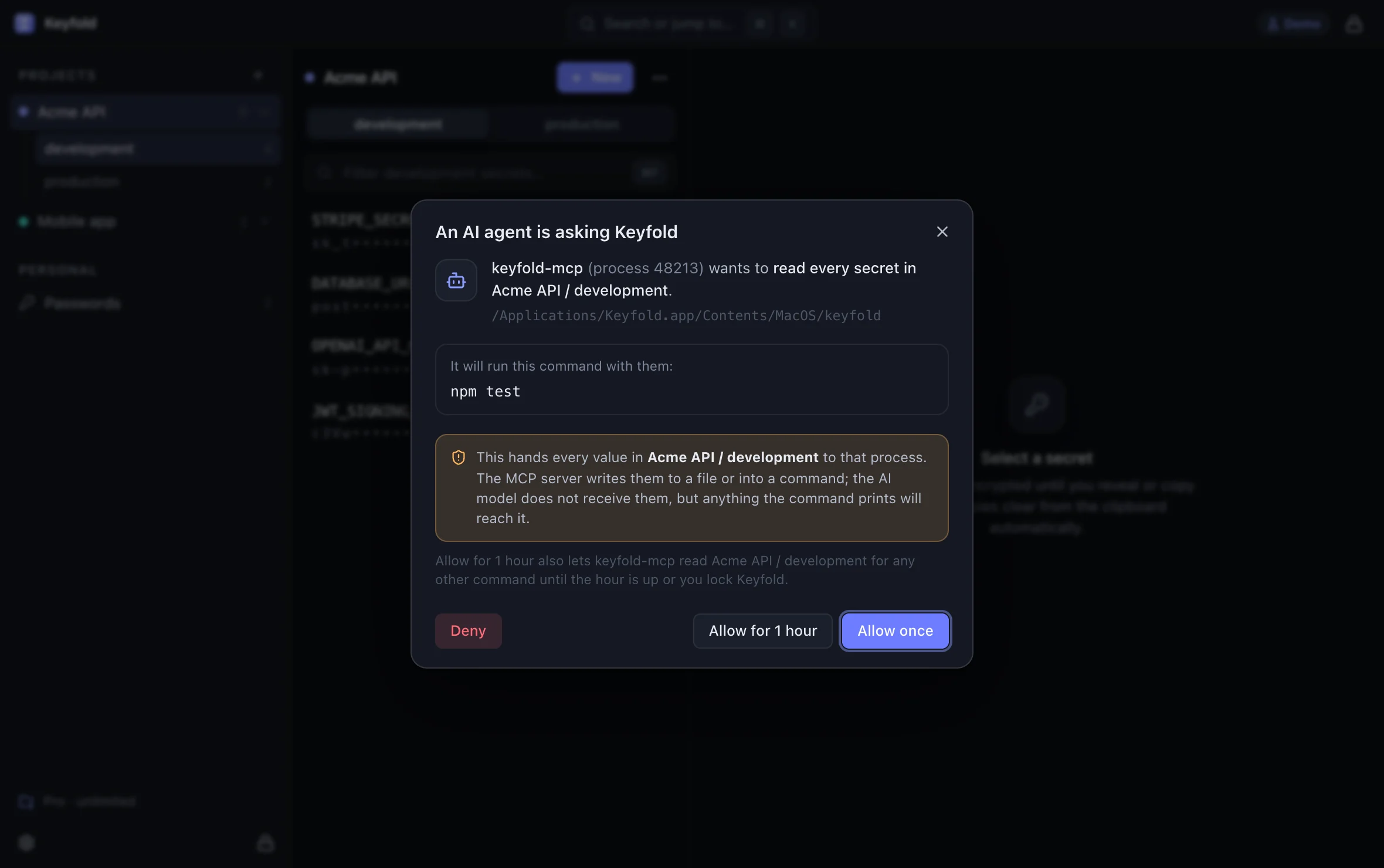
Open the approval sheet in the live demoOpens the live demo, with made-up keys
Its gap is item 4 in the list above: the run tool returns the command's output so the agent can read test results. A command that prints a key shows it. Keyfold's sheet tells you the agent wants every value in that project and environment, and which command it will run. Under a one-hour grant, later commands get no new sheet, so keep your agent's own prompt on for Keyfold's run tool: then printenv or cat .env is easy to deny. It's still a judgement you make.
1Password Environments. 1Password's Environments MCP server takes the same approach: per its docs, it "can only see variable and Environment names, and never returns the secrets stored in your Environments", and the desktop app shows an authorization prompt. The Claude Code and Cursor setups are marked beta, and it needs a 1Password account.
Servers that return values. Some password-manager MCP servers can return a stored password or key to the agent, which is convenient and exactly the risk described above. Check each server's tool list before connecting it. Keyfold's comparison table notes this for the tools it compares.
What you can do today, with any client
- Prefer servers whose tools return names and results, not values.
- Keep approval on for any tool that touches secrets or runs commands.
- Don't put API keys in MCP config files. Use the server's own login, an environment variable set at launch, or a vault.
- Split the trifecta where you can. An agent that's reading untrusted web content doesn't also need access to production keys.
- Use separate, low-scope keys for agents. A development key with a spending limit is a much smaller loss than your production key.
- Read the command before you approve it. Most exfiltration attempts look odd:
curlto an unknown host,printenv,base64of a file.
For Claude Code specifically, the earlier post on keys and Claude Code shows the deny rules and sandbox settings that keep .env files out of reach.
FAQ
Is MCP more dangerous than an agent with a shell?
Not by itself. A shell can already read files and send data out. MCP makes it easier to add more tools from more sources, which adds more ways in for untrusted text and more data to reach.
Can a prompt injection make Keyfold reveal a key?
There is no tool for it to call. The worst an injected request can do is ask to run a command or write a file. That request waits in Keyfold's sheet, which shows the command or the file, for you to approve or deny. The exception is a one-hour grant for that project and environment that is still running: then only your agent's own tool prompt shows the command.
Should I turn off the client's confirmation prompts?
Not for tools that touch secrets or run shell commands. If the prompts are too frequent, use time-limited grants for one project and environment instead of turning them off everywhere.
Are remote MCP servers riskier than local ones?
They add a network service that holds credentials, and OAuth flows bring their own risks, which the MCP security best practices cover. For secrets, a local server is the simpler model.
Where can I try a server like this?
The live demo shows Keyfold's approval sheet with made-up keys, and the security page explains what the agent connection can and can't do.
Keep reading

How to let Claude Code use an API key without seeing it
Claude Code can read .env files and print environment variables. Here is how to let it run your tests with real keys while the values stay out of the chat.

Pushed an API key to GitHub? Do this in the next 10 minutes
Leaked an API key in a public repo? Revoke it first, check what it was used for, then clean the history. The steps, and rotation links for 20 providers.