Where should you store API keys on a Mac?

The difference between these places is who can read the key. A .env file or an export line is plain text: it can end up in a git commit or a backup, and any program running as you can read it, including an AI agent in your terminal. An encrypted store keeps the key unreadable on disk, and reading it at run time means it reaches only the command that asked for it. On a Mac that's one of three places: the macOS Keychain (built in, fine for a few keys), a password manager with a command line (good if you already pay for one), or a developer vault that organises keys by project and environment.
Which one fits depends on how many keys you have, whether you work alone, and whether AI agents run commands for you. Here is how the options compare, with the commands for each.
The options at a glance
| Encrypted on disk | By project and environment | Easy in scripts | Agents can use without reading | Risk of ending up in git | |
|---|---|---|---|---|---|
.env file in the project |
No | One file per environment | Yes | No, they can open the file | High |
export in ~/.zshrc |
No | No | Yes | No, every process inherits it | Medium (dotfiles repos) |
| macOS Keychain | Yes | No, you name items yourself | Yes, with security |
No, a command prints the value | Low |
| Password manager with a CLI | Yes | Some (1Password Environments) | Yes (op run) |
Some (1Password's MCP server) | Low |
| Developer vault (Keyfold) | Yes | Yes | Yes (keyfold run) |
Yes, per-request approval | Low |
| Cloud secrets manager (Doppler, Infisical) | Yes | Yes | Yes | Depends on the tool | Low |

The rest of this post goes through them from the most common to the most structured.
Plain .env files: convenient, and the most common leak
A .env file next to your code is easy, and every framework reads it. It's also plain text. It gets committed by accident, copied into Docker images, synced by cloud folders, attached to support tickets and read by AI coding agents that open files in your project. GitGuardian counted 28.65 million new secrets in public GitHub commits in 2025, and .env files are one of the usual sources.
If you keep using them, keep them out of git (.env and .env.* in .gitignore, and check git ls-files | grep env), and keep separate files and separate keys per environment.
Exports in your shell profile: every program can see them
Lines like export OPENAI_API_KEY=sk-… in ~/.zshrc are the second most common habit. The key is plain text in your home folder, it ends up in dotfiles repos and backups, and every program you start from that shell inherits it: your editor, every script, and any AI agent you run in the terminal. One printenv shows all of them.
If a tool needs a key, give it to that tool when it runs (see the vault section below), not to your whole shell.

The macOS Keychain: built in and encrypted
The Keychain is a good free option for a handful of keys. It's encrypted, it's unlocked with your login, and the security command lets scripts use it.
Add a key. Put -w last with no value, so you're prompted for it and it never lands in your shell history (the man page calls this "recommended"):
$ security add-generic-password -a "$USER" -s OPENAI_API_KEY -wRead it back in a script, or give it to one command:
# Read it back (prints the value)
$ security find-generic-password -a "$USER" -s OPENAI_API_KEY -w

# Give it to one command
$ OPENAI_API_KEY="$(security find-generic-password -a "$USER" -s OPENAI_API_KEY -w)" npm start
Update an existing item by adding -U to the add command.
Where it gets awkward:
- No structure. The Keychain doesn't know that
STRIPE_SECRET_KEYexists in development and production for three projects. You invent a naming scheme (acme-dev-STRIPE_SECRET_KEY) and keep it consistent yourself. - Shared with everything else. Wi-Fi passwords, app tokens and browser data live in the same place, so browsing and cleaning up developer keys is slow.
A password manager with a command line
If you already use 1Password, its CLI injects keys into one command without putting them in a file. You write secret references instead of values:
# dev.env holds references like: OPENAI_API_KEY="op://dev/OpenAI/credential"
$ op run --env-file=./dev.env -- npm start
op run "loads the specified secrets, then runs the provided command in a subprocess", so the key exists only for that process. 1Password also has Environments for project variables and an MCP server for agents that returns names, not values. The trade-offs are an account and a subscription, and the vault lives in their cloud. For a team that's often what you want.
Bitwarden has a separate Secrets Manager product with its own CLI for the same job.
A developer vault: keys by project and environment
This is the gap I built Keyfold for. Keys live in one encrypted file on your Mac, organised as projects, then environments (development, staging, production), then keys, each with notes, tags, an expiry date and the link to where you rotate it.
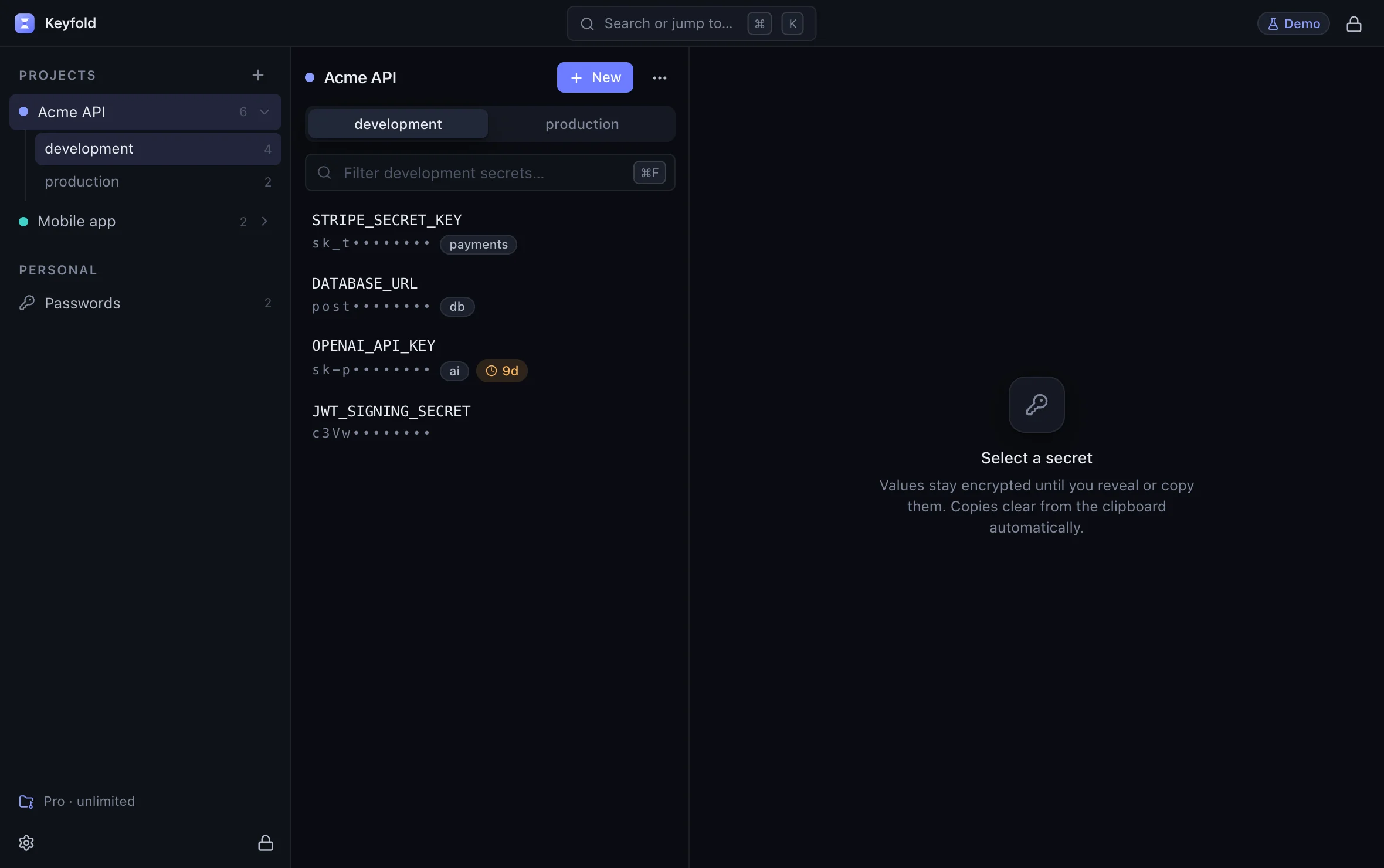
Open Keyfold's main window in the live demoOpens the live demo, with made-up keys
You give keys to one command at a time:
$ keyfold run -p acme-api -e development -- npm testAI agents get an MCP server whose tools never return a value, and every request waits for your approval in the app. There's no account and no cloud, and the app makes no network connections unless you allow a daily update check. The encryption details (Argon2id and XChaCha20-Poly1305) and what the design can't protect against are on the security page.
Cloud secrets managers
Doppler, Infisical and the cloud providers' own secret managers are built for teams and production: shared access, audit logs, rotation and syncing to CI and hosting platforms. For a solo developer's laptop they're often more than you need, and they mean an account and a network connection for every local run. Many teams use one for production and something local for development.
Which one should you pick?
- A few keys, working alone, no agents: the Keychain is fine. Use the commands above and a consistent naming scheme.
- You already pay for 1Password and work with a team: use
op runand 1Password Environments. - Many projects and environments, working alone, AI agents in the loop: a developer vault like Keyfold, which is designed for exactly that.
- Production servers and CI: your hosting platform's secrets settings or a cloud secrets manager.
Whatever you pick, the two moves that matter most are the same: get keys out of plain files in your projects, and stop exporting them to your whole shell. The comparison table lines up Keyfold, 1Password, Bitwarden, KeePassXC and plain .env files feature by feature, and the live demo shows Keyfold with made-up keys.
FAQ
Is the macOS Keychain safe for API keys?
Yes, it's encrypted and tied to your login, and it's a reasonable place for a few keys. Its limits are organisation and the fact that any command running as you can read an item you've allowed.
Should I put API keys in ~/.zshrc?
No. They're plain text there, and every program you start, including AI agents, inherits them. Inject keys per command instead.
Is a .env file ever OK?
For throwaway local projects with test keys, it's a fair trade-off. Keep it out of git, never put production keys in it, and delete it when you're done.
What about iCloud Keychain?
Items you put in the iCloud keychain sync to your other Apple devices. That's convenient for passwords, and something to think about for production API keys you'd rather keep on one machine.
Does Keyfold replace my password manager?
It can hold logins and 2FA codes too, but it has no browser autofill yet. Many developers keep their password manager for websites and use Keyfold for project keys.
Keep reading

Pushed an API key to GitHub? Do this in the next 10 minutes
Leaked an API key in a public repo? Revoke it first, check what it was used for, then clean the history. The steps, and rotation links for 20 providers.

Is MCP safe for API keys? Prompt injection and secrets
MCP is as safe as the server's tools and your approvals. How API keys leak through MCP, what the spec asks for, and a checklist for judging a secrets server.

How to let Claude Code use an API key without seeing it
Claude Code can read .env files and print environment variables. Here is how to let it run your tests with real keys while the values stay out of the chat.